
%201.svg)
HubSpot Sales Hub vs. Microsoft Dynamics 365 Sales: A Practical Comparison
HubSpot Sales Hub vs. Microsoft Dynamics 365 Sales: the short answer
HubSpot Sales Hub and Microsoft Dynamics 365 Sales are both capable sales CRM platforms, but they are designed around different operating models. HubSpot is usually the stronger fit for companies that value fast implementation, intuitive day-to-day use and closely connected marketing, sales and service processes. Microsoft Dynamics 365 Sales is often the better choice for organisations that already rely heavily on Microsoft 365, Azure, Power Platform or other Dynamics applications and need extensive enterprise customisation.
The right decision is therefore not about which platform has the longest feature list. It is about which system your sales team will actually adopt, which one fits your wider technology landscape and how much implementation and administration your organisation can realistically support.
What exactly is being compared?
This comparison focuses on HubSpot Sales Hub and Microsoft Dynamics 365 Sales as sales platforms. It does not compare the entire HubSpot Customer Platform with every product in the Dynamics 365 suite. That distinction matters: some capabilities, including advanced marketing automation, account-based marketing, customer service, CPQ or operational processes, may require additional hubs, Dynamics applications, licences or usage credits.
The evaluation covers the areas that have the greatest impact on real-world CRM success: implementation, usability, sales automation, AI, prospecting, data and intent, scoring, reporting, collaboration, ecosystem fit, customisation and total cost of ownership.
- Unified marketing, sales and service experience: Advantage HubSpot
- Complex CRM-to-ERP scenarios: Advantage Dynamics 365
- Sales automation and forecasting: Strong in both; the better fit depends on process complexity
- AI-assisted selling: Strong in both; packaging, credits and ecosystem determine practical value
1. Time-to-value and implementation
HubSpot is built around a relatively standardised customer data model and a business-friendly configuration experience. Core tools such as pipelines, email templates, meetings, tasks and deal management are available quickly. For many small and mid-market teams, this shortens the path from licence purchase to productive use. More advanced implementations still require proper process design, data migration, permissions, automation and reporting, but the platform places fewer technical barriers in front of the business team.
Dynamics 365 Sales can also be implemented in phases, but its biggest strength is flexibility. Dataverse, model-driven apps, Power Automate, security roles and connections to other Microsoft products create a much broader solution space. That flexibility is valuable when processes are complex, but it also creates more decisions during solution design. Companies often need stronger involvement from IT, system administrators or a specialised implementation partner before the full value becomes visible.
Verdict: HubSpot usually wins when speed and a lower implementation burden are critical. Dynamics 365 wins when the business case depends on deep process modelling and the organisation is prepared to invest in solution architecture.
2. Ease of use, adoption and ongoing administration
A CRM only creates value when sales representatives keep records current and use the system consistently. HubSpot's navigation, record layouts, task queues and sales workspace are designed to reduce friction for customer-facing teams. Routine changes such as creating properties, editing views, adjusting pipelines or building standard workflows can often be handled by a trained CRM owner without a development team.
Dynamics 365 offers a powerful and customisable user experience, especially for teams already working in Outlook and Teams. However, a highly tailored Dynamics environment can become more dependent on administrators, solution owners and governance. That is not automatically a disadvantage: large organisations may actively want this degree of control. It does mean that change requests, testing and release management should be factored into the operating model.
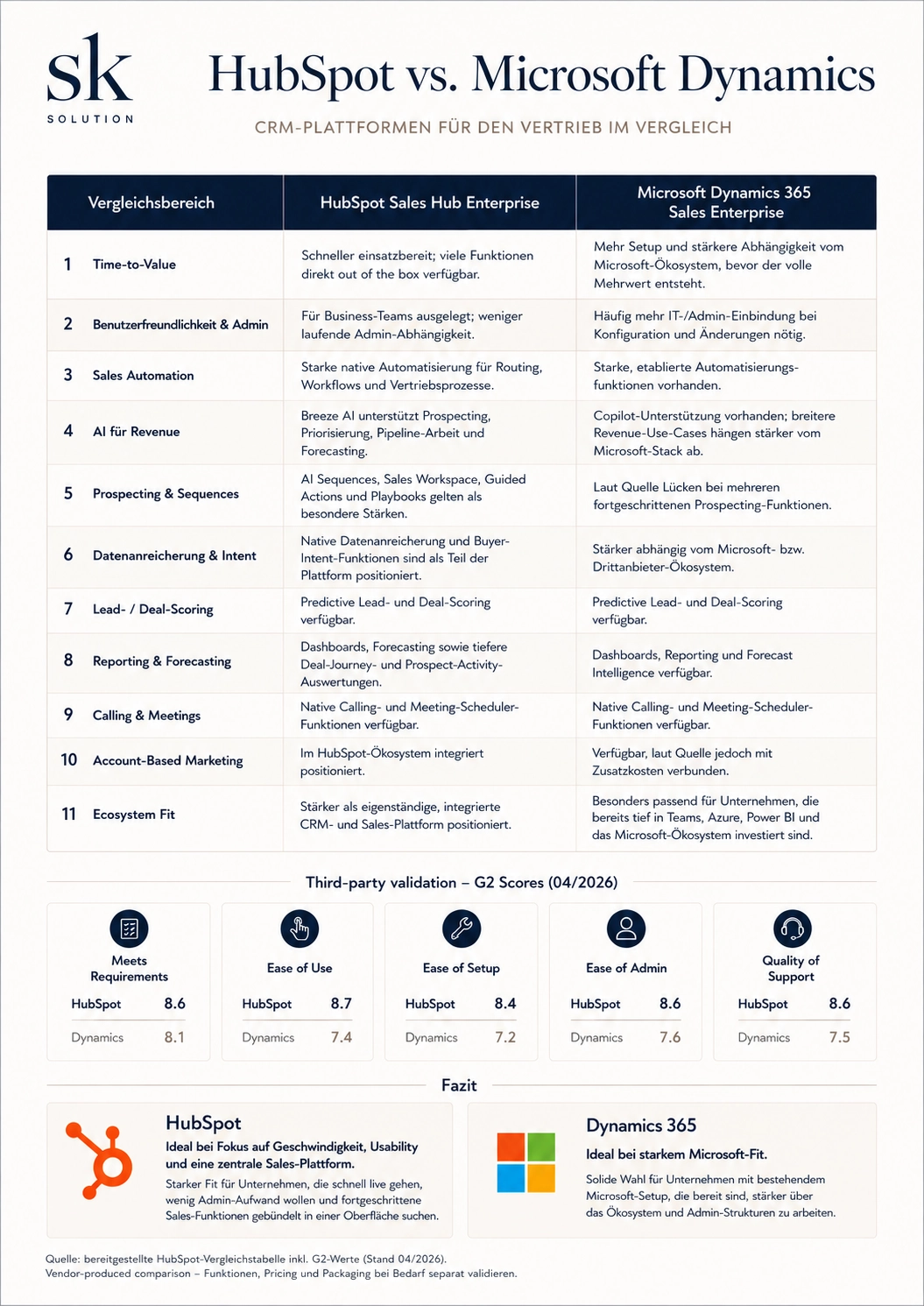
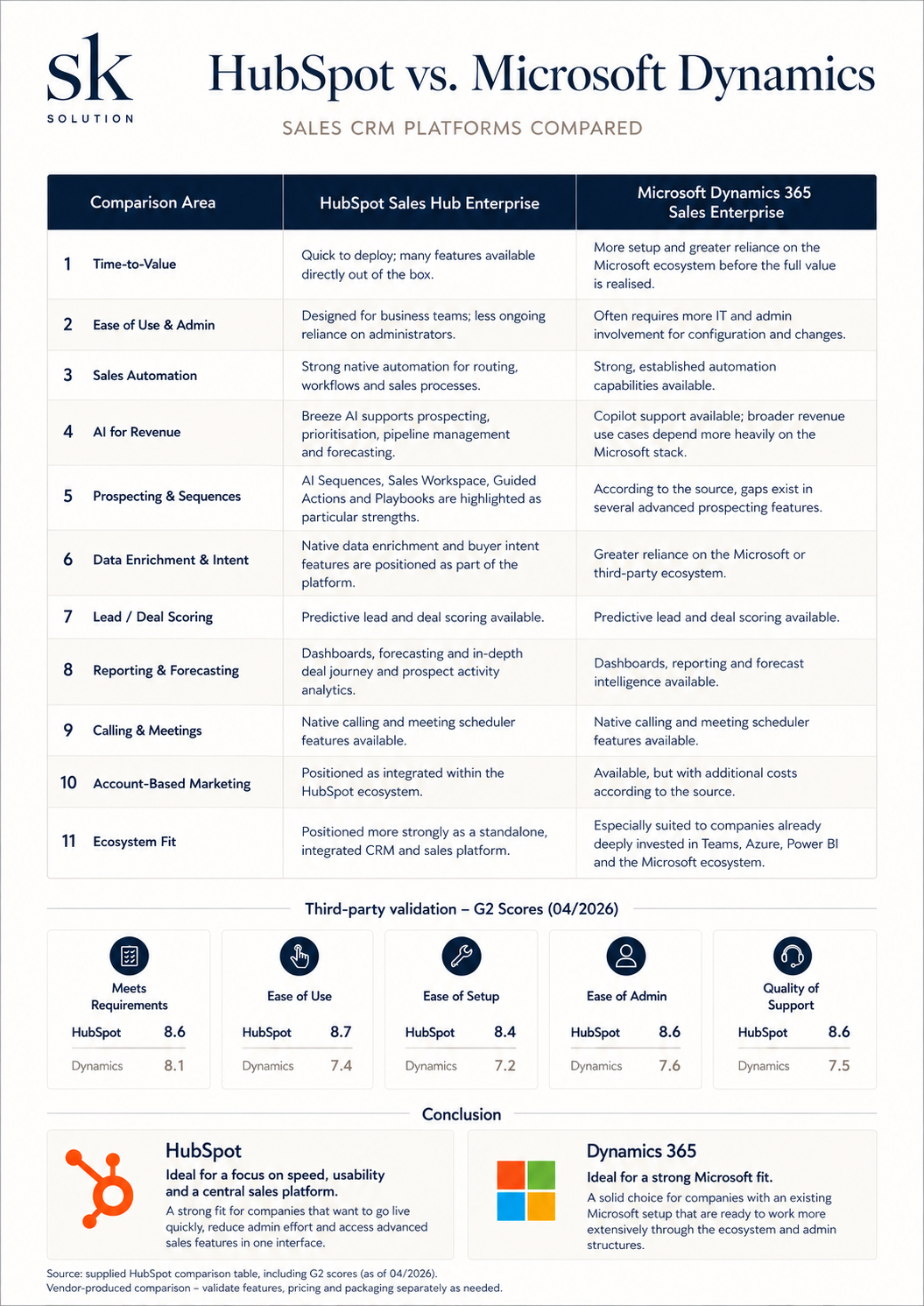
A G2 comparison snapshot from April 2026 reinforces the usability difference. HubSpot Sales Hub scored 8.7 for ease of use, 8.4 for ease of setup and 8.6 for ease of administration, compared with 7.4, 7.2 and 7.6 for Dynamics 365 Sales. It also led in meeting requirements and quality of support. Review scores change over time and should be treated as supporting evidence, not as a substitute for testing your own use cases.
3. Core CRM and pipeline management
Both platforms manage leads, contacts, companies or accounts, activities, opportunities or deals, pipelines and forecasts. Both can support multiple sales processes, custom fields, permissions and reporting. The practical difference lies in how quickly the standard model meets your needs and how far you want to extend it.
HubSpot provides an opinionated but flexible structure that is easy to understand across marketing, sales and service. Contacts, companies, deals and tickets share a consistent interface and association model. Enterprise editions add custom objects for organisations that need data beyond the standard CRM structure. HubSpot is particularly effective when the customer journey begins on the website and should continue through lead capture, nurturing, qualification, sales handover and service on one platform.
Dynamics 365 Sales uses Microsoft Dataverse and is stronger when the CRM must be part of a wider application landscape. It can support highly specific entity relationships, forms, business process flows, custom applications and connections to operational systems. For organisations that need the sales platform to mirror complex internal structures, this flexibility can be decisive.
4. Sales automation and workflow design
HubSpot offers native workflows for routing, task creation, property updates, notifications, lifecycle management and other sales processes. Sequences support structured one-to-one outreach, while workflow automation handles system-driven actions. The visual workflow editor is accessible to operational teams, which makes continuous optimisation easier when governance is clearly defined.
Dynamics 365 combines native sales automation with business process flows and the wider capabilities of Power Automate and Power Apps. This can connect sales processes to approvals, documents, finance, service or external systems. The ceiling is higher for complex cross-functional automation, but architecture, licensing and maintenance can also become more demanding.
Verdict: HubSpot is usually more efficient for standard and moderately complex revenue workflows. Dynamics 365 is more suitable when sales automation must extend deeply into Microsoft-based operational processes.
5. Prospecting, sequences and guided selling
HubSpot brings lead management, prospecting tasks, sequences, email templates, calling, meeting scheduling and guided actions into a focused sales workspace. This makes it easy for representatives to move from prioritisation to outreach without constantly changing tools. For teams that want a cohesive prospecting experience with limited setup, this is one of HubSpot Sales Hub's strongest areas.
Dynamics 365 provides sales accelerator worklists, sequences, predictive prioritisation and multichannel engagement capabilities. Microsoft has continued to expand agent-powered lead qualification and opportunity guidance, so it should no longer be viewed as lacking modern prospecting tools. The deciding factor is often packaging and configuration: capabilities may depend on edition, included capacity, Copilot credits or additional Microsoft products.
Verdict: HubSpot has the advantage for an immediately coherent, business-friendly prospecting workflow. Dynamics 365 can be equally powerful when configured as part of a wider Microsoft sales environment.
6. AI for revenue teams: Breeze versus Copilot and sales agents
HubSpot embeds AI across prospecting, data research, guided selling, forecasting, meeting preparation and deal progression. Breeze Prospecting Agent can research accounts and support personalised outreach, while AI-assisted features help representatives prioritise work, summarise context and identify next actions. The key advantage is that AI operates on the same customer platform used by marketing, sales and service.
Microsoft Dynamics 365 Sales includes Copilot capabilities such as natural-language insights, email and meeting assistance and opportunity summaries in relevant editions. Microsoft also offers agents for lead qualification and opportunity management. These capabilities become especially compelling when customer data, collaboration and productivity already live in Microsoft 365, Teams, Azure and Dataverse.
Neither platform should be selected on an AI label alone. Buyers need to verify which features are generally available, which are still in preview, what data they can access, how credits are consumed and whether additional licences or an Azure subscription are required.
Verdict: HubSpot offers a simpler integrated AI experience for many go-to-market teams. Dynamics 365 offers broader Microsoft-native potential, particularly in mature enterprise environments.
7. Data enrichment, buyer intent and scoring
HubSpot positions enrichment and buyer-intent signals close to the CRM record. Depending on the subscription and available credits, teams can enrich company data, identify high-interest accounts and combine fit with behavioural engagement. Predictive lead and deal scoring are available in advanced editions, while custom score properties can support more transparent qualification models.
Dynamics 365 supports predictive lead and opportunity scoring, relationship intelligence and AI-assisted recommendations. Premium capabilities include AI-powered data enrichment, while Microsoft Relationship Sales connects Dynamics 365 Sales Enterprise with LinkedIn Sales Navigator. For organisations already invested in Microsoft and LinkedIn, this can create a strong account intelligence layer.
The important design question is not simply whether scoring exists. A useful model must define which object is scored, which behaviours indicate intent, how negative signals and decay are handled and what operational action follows each threshold. The technology cannot compensate for an unclear qualification strategy.
8. Reporting and forecasting
HubSpot provides dashboards, sales analytics, pipeline reporting, forecast categories and AI-supported forecasting in a comparatively accessible interface. It is well suited to teams that want managers and RevOps users to create and adapt reporting without building a separate business intelligence environment.
Dynamics 365 offers dashboards, forecast intelligence and native connections to Power BI. This is a major advantage for organisations that already use Power BI as their analytics standard or need to combine CRM data with finance, operations and other enterprise datasets. The trade-off is a greater need for data modelling, governance and specialist reporting knowledge.
Verdict: HubSpot wins for fast, self-service sales visibility. Dynamics 365 wins when enterprise-wide analytics and Power BI integration are more important than simplicity.
9. Calling, meetings and collaboration
Both platforms support sales calls, email activity, meeting workflows and collaboration. HubSpot offers native calling and meeting scheduling as part of the sales experience, with automatic CRM logging depending on setup and licence. Dynamics 365 integrates closely with Outlook and Teams, including contextual CRM data, Teams calling options and meeting assistance.
If the sales team lives primarily in HubSpot, its all-in-one workflow reduces context switching. If Outlook and Teams are already the daily operating environment, Dynamics 365 can bring CRM context into tools users know well. The better user experience therefore depends heavily on where representatives already spend their time.
10. Ecosystem fit, integrations and account-based marketing
HubSpot's main ecosystem advantage is consistency across its own customer platform. Marketing, sales, service, content, data and revenue tools can work on the same CRM records, permissions and automation layer. Its app marketplace also supports a wide range of common business tools. This makes HubSpot attractive when the goal is to connect the website and lead generation directly with qualification, pipeline management and customer service.
Dynamics 365's advantage is Microsoft. Outlook, Teams, Power BI, Azure, Dataverse, Power Apps and Power Automate can form a highly connected enterprise environment. Companies that also use Dynamics applications for finance, operations, field service or customer service can align front- and back-office processes more deeply than a standalone sales CRM normally allows.
Account-based marketing illustrates the packaging issue on both sides. HubSpot supports ABM through the wider HubSpot platform, particularly when Sales Hub is combined with suitable Marketing Hub capabilities. In the Microsoft landscape, account-based journeys and deeper marketing orchestration may involve Customer Insights, LinkedIn or additional tools. Buyers should compare the complete target architecture rather than assuming every ecosystem capability is included in the sales licence.
11. Customisation, governance and scalability
HubSpot can support sophisticated sales organisations with custom properties, teams, permission sets, multiple pipelines, workflows, custom objects and integrations. Its strength is controlled flexibility: most common revenue processes can be configured without turning the CRM into a bespoke software project. This often makes the platform easier to maintain as the business evolves.
Dynamics 365 offers a higher customisation ceiling through Dataverse and Power Platform. Organisations can create custom tables, apps, forms, security models, automations and integrations around specific business requirements. This is particularly valuable in regulated, multi-entity or operationally complex environments. The corresponding risk is over-customisation. Without strong architecture and governance, upgrades and everyday administration can become unnecessarily difficult.
Verdict: HubSpot scales well for companies that want powerful revenue operations with manageable complexity. Dynamics 365 is stronger when enterprise requirements justify a more engineered platform.
12. Pricing and total cost of ownership
List price is only one part of CRM cost. As of September 2026, HubSpot lists Sales Hub Professional from USD 90 per seat per month when paid annually and Enterprise from USD 150 per seat per month. Required one-time onboarding fees are listed for Professional and Enterprise. HubSpot also uses credits for selected AI agents and data features.
Microsoft lists Dynamics 365 Sales Professional at USD 65 per user per month, Sales Enterprise at USD 105 and Sales Premium at USD 150, paid yearly. Sales Premium includes additional sales intelligence and Copilot credits. Agent usage can create separate credit costs, and some scenarios require Azure or adjacent Microsoft products.
Dynamics 365 Enterprise therefore has a lower published seat price than HubSpot Sales Hub Enterprise, but this does not automatically mean a lower total cost. A realistic calculation should include:
- Implementation and solution design
- Data migration and data quality work
- Required onboarding or consulting
- Additional hubs, Dynamics apps, Power Platform, Power BI or Azure capacity
- AI, enrichment and usage credits
- Integrations and middleware
- Internal administration and change management
- Training, adoption and ongoing optimisation
HubSpot can be more economical when a simpler setup reduces implementation and administration. Dynamics 365 can create greater long-term value when it replaces disconnected Microsoft-based processes or connects CRM with core operations. Always validate current packaging and regional pricing directly with the vendors before making a business case.
Which CRM is right for your business?
HubSpot Sales Hub is likely the better fit when:
- Your biggest risk is low CRM adoption.
- You want to go live quickly and improve continuously.
- Marketing, sales and service should work from one customer record.
- Your website and inbound lead generation are central to growth.
- You need strong automation without a large internal IT team.
- Your processes are sophisticated but do not require a deeply customised enterprise application landscape.
Microsoft Dynamics 365 Sales is likely the better fit when:
- Your organisation is strategically committed to Microsoft 365, Azure and Power Platform.
- Sales data must connect deeply with finance, operations, supply chain or other Dynamics applications.
- You need highly individual data models, custom apps or complex security requirements.
- Power BI is your central reporting environment.
- You have the governance, budget and specialist resources to operate a more engineered CRM solution.
A hybrid architecture can also be valid. Some organisations use HubSpot for marketing and digital lead generation while Dynamics 365 remains the sales or operational system of record. This approach can combine strengths, but only if ownership, field mapping, consent, lifecycle logic, deduplication and synchronisation rules are designed carefully. Otherwise, the integration simply moves complexity between platforms.
Final verdict
For companies that want speed, usability and a central platform from first website interaction to closed deal, HubSpot Sales Hub is often the stronger choice. For enterprises with a mature Microsoft landscape and complex cross-department requirements, Microsoft Dynamics 365 Sales can provide the deeper strategic fit.
The decisive question is not which CRM can do more in theory. It is which platform can support your real processes with the least unnecessary complexity, the highest user adoption and a sustainable operating model.
Sources and methodology
- HubSpot Sales Hub product overview
- HubSpot Sales Hub pricing
- Microsoft Dynamics 365 Sales overview
- Microsoft Dynamics 365 Sales pricing
- G2: Dynamics 365 Sales vs. HubSpot Sales Hub
Feature availability and pricing were reviewed in September 2026. Vendor packages, limits, previews and prices may change. The G2 values shown in the accompanying comparison graphic are a snapshot from April 2026.
.svg)
%201.svg)