
n8n vs. Make vs. Zapier: Which Automation Tool Fits Your Business?
n8n, Make and Zapier can connect business applications, but they should not be selected by the number of logos on an integrations page. The right automation tool must support your actual data flow, handle failures predictably and have an accountable owner. Compare the full operating model, not just the first workflow you can build.
For a simple handover, a ready-made connector may be sufficient. For branching processes, data transformation or specialised APIs, evaluate how each platform handles the required logic. If the applications already offer a suitable native integration, test that first before introducing another system.
Start with one complete business process
Consider a website enquiry that must create or update a CRM contact, associate a company, assign the correct team and notify the owner. Define the matching rule and the source of each field before choosing an automation platform.
The difficult part is often an exception: the company exists under a different spelling, the owner is inactive or the CRM is temporarily unavailable. A useful proof of concept includes these situations. A successful test with a single new contact is not sufficient evidence for production readiness.
Write an event contract in plain language. State what starts the process, what identifies the record, which fields are mandatory and what counts as completed. The contract should remain understandable even if you change tools later.
Compare billing units, not just monthly prices
The platforms do not all measure usage in the same way. n8n's pricing page describes execution-based plans. Make uses credits, with consumption depending on the actions and features involved. Zapier's task documentation explains how successful actions and other step types count.
This means one business event is not necessarily one billable unit on every platform. Model a realistic month using the actual number of records, actions, branches and retries. Check current rules for the specific product and plan; do not use an old “operations versus tasks” comparison as a permanent pricing model.
Separate platform charges from external API or AI-model charges where applicable. A workflow can be inexpensive to execute while still expensive to maintain if its logic is undocumented or fragile.
Treat self-hosting as an operating responsibility
n8n provides self-hosting options as well as hosted offerings. Its official deployment documentation describes the installation model. Self-hosting can be relevant when infrastructure control is a genuine requirement, but it does not eliminate responsibility for updates, backups, access and monitoring.
Do not assume a self-hosted system is automatically compliant or cheaper. Ask who will restore it after an outage, rotate credentials and respond to a security issue. Review the current licensing terms for the intended business use separately, especially when operating services for others.
For managed platforms, examine access roles, available execution history, credential ownership and the process for handing the account over to another administrator. Convenience matters, but the business should not depend on one freelancer's personal login.
Test failure recovery before launch
Reliability comes from design as well as the platform. Use stable identifiers and avoid creating a new record every time a request is retried. Where a workflow can be replayed, ensure that a replay does not send another email or create a duplicate deal unintentionally.
Your test should include:
- A duplicate trigger carrying the same business record.
- A required value that is missing or invalid.
- A temporary API failure after an earlier step succeeded.
- A disconnected account or expired credential.
- A replay after the underlying problem has been corrected.
Document whether the process stops, retries or routes an exception to a person. That behaviour should be deliberate and visible to the team. “The scenario ran” is not the same as “the business handover completed.”
Choose through a scoped proof of concept
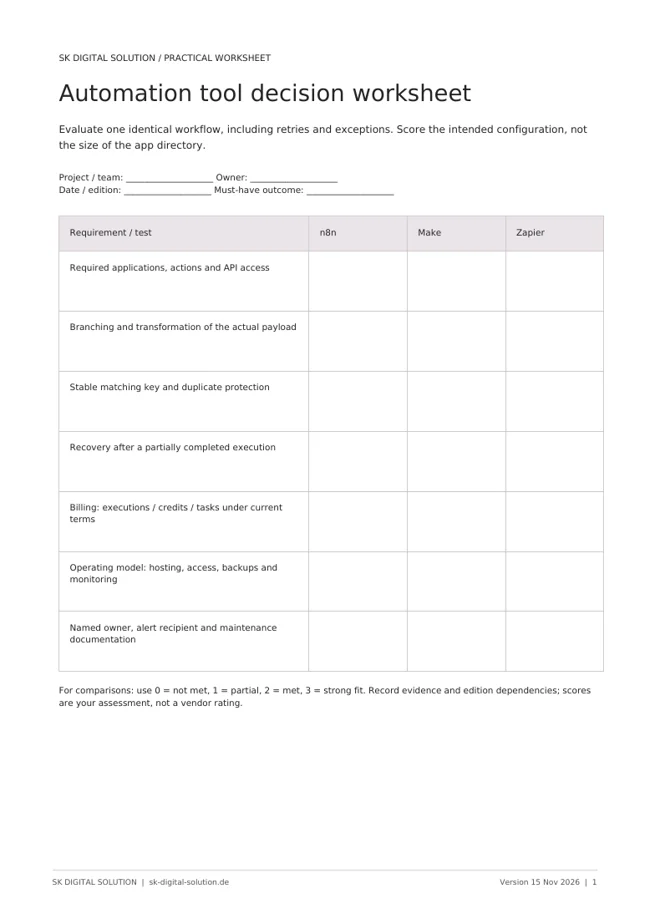
Shortlist the tools that support the required applications and actions, then implement the same bounded process in the strongest candidates. Evaluate setup effort, readability, exception handling and recurring cost with the intended owner involved.
A connector-first tool may be appropriate for a straightforward handover. A more configurable workflow approach may suit complex transformations or an API-led architecture. These are evaluation directions, not universal rankings: a well-designed simple workflow can be more valuable than an elaborate system nobody maintains.
Keep production ownership in writing. Name the business owner, technical owner, alert recipient and recovery process. Add a review whenever a connected application changes its fields or authentication.
Frequently asked questions
Is n8n always the cheapest option? No. Compare current execution or licence costs together with infrastructure and administration. Free software access is not the same as a zero-cost production service.
Can Make or Zapier replace HubSpot workflows? They can connect systems, but should not automatically replace logic that belongs inside the CRM. Keep lifecycle and ownership rules close to their authoritative data where practical.
Which tool is best for AI automation? Start with the task, data access, evaluation and escalation requirements. Availability of an AI connector does not prove that the overall process is reliable.
SK Digital Solution designs the business handover before choosing the integration layer. Discuss the workflow you want to automate.
Vendor documentation checked on 15 November 2026. Billing models and product packaging are time-sensitive; confirm them before committing.