
PandaDoc and HubSpot Integration: Build a Reliable Proposal Process

A PandaDoc HubSpot integration can reduce repeated proposal entry, but the real value comes from a controlled process: the correct deal creates the correct document, approved values populate the template and document events update the CRM in a deliberate way. Without those rules, automation simply moves inconsistent data faster.
Start with one proposal type and one pipeline. Decide what makes a deal ready for a proposal before connecting every template, product and status. A narrow, testable implementation is easier to trust than a large catalogue of automations whose ownership is unclear.
Define the source of each proposal value
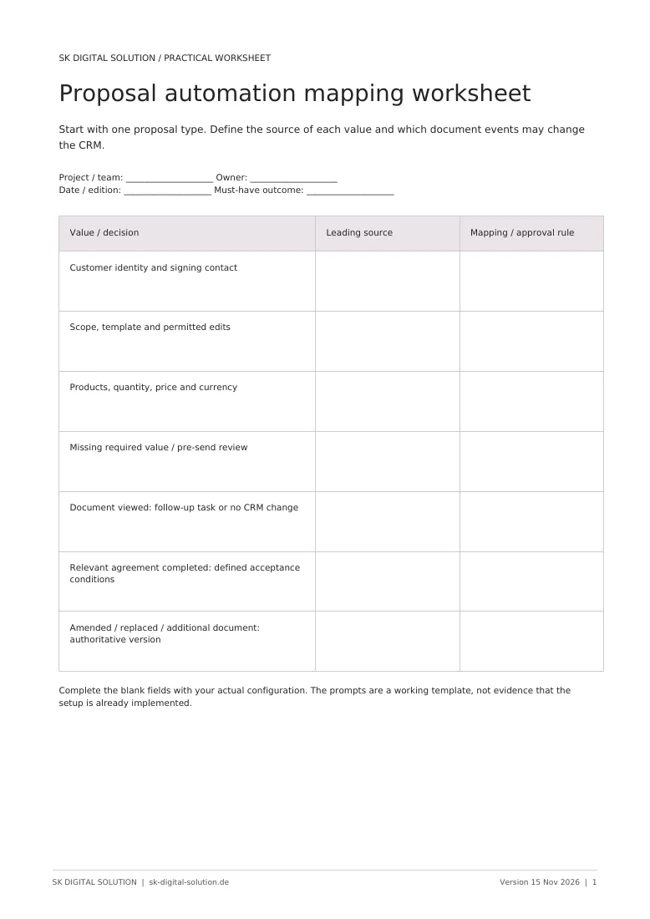
List the information a proposal requires: customer identity, contact, scope, products, quantity, price, currency and commercial terms. Decide which values come from HubSpot, which are maintained in the PandaDoc template and which require human approval.
PandaDoc's HubSpot integration documentation describes passing CRM information into documents, configuring variables and pricing tables, and passing document information back to HubSpot. The available behaviour depends on the integration configuration and current subscription.
Do not assume a field will populate because its display label looks familiar. Record its internal name, source object and intended destination. A contact value is different from a company value, and the correct signing contact may not be the first person associated with the deal.
A mapping sheet should also define what happens when a value is absent. A missing project address may be acceptable in one template, while a missing currency should prevent a commercial document from being sent. Make these distinctions explicit.
Standardise templates without hiding judgement
Use a template to keep the approved structure consistent. Separate reusable legal or commercial wording from the parts that change per proposal. A salesperson should understand which sections they may edit and which changes need approval.
Template automation is not a substitute for scope review. If a website project includes a customer portal or a specialised integration, those requirements need to be evaluated rather than selected from a generic paragraph. Standardisation should remove repetitive work, not conceal an unpriced dependency.
Create a review step before sending. Verify the company, recipient, currency, scope and commercial terms against the approved deal. This is especially important when a record has several contacts or when a previous document is duplicated.
Align products, pricing and document state
Define whether products and prices are authoritative in HubSpot, PandaDoc or another system. If a user changes a line item in a document, decide whether that change should update the CRM, trigger review or remain a document-only adjustment.
Do not let two systems overwrite each other's values without a conflict rule. A pricing integration can appear correct in the first test and become inconsistent when somebody edits the proposal after creation. Test amendments and not just the first generated version.
Distinguish document states from sales stages. A document created, sent, viewed or completed describes the document. It does not automatically mean the corresponding business opportunity has reached the next stage in your organisation's definition.
Automate deal updates conservatively
PandaDoc documents configuration options for updating HubSpot based on document status. Treat those updates as business rules, not defaults that should always be enabled. Confirm which document is authoritative when several documents are linked to the same deal.
A viewed proposal might justify a follow-up task without changing the forecast. A completed document might support a closed-won transition only when it is the relevant agreement and the business has defined any remaining acceptance conditions. The implementation must respect your actual sales policy.
Test the process with:
- A deal with more than one associated contact.
- A missing required value or mismatched currency.
- An amended or replaced proposal.
- Several documents attached to one opportunity.
- A declined or expired document.
- A repeated event that must not create another task or update.
Keep evidence of the expected outcome and the actual CRM changes. A successful integration connection does not establish that these edge cases work.
Make the handover to delivery explicit
Proposal acceptance is also a handover point. Decide who receives the approved scope, which document is the final version and what the project team needs before starting work. Avoid making delivery search through a salesperson's inbox to understand what was agreed.
Review the process after launch. Look for manual corrections, duplicated documents and deal stages that no longer reflect reality. These are signs that the data or status rules need refinement, not necessarily that the integration itself is broken.
Frequently asked questions
Does the integration replace proposal review? No. It can populate and track documents, but the business still needs to approve scope, recipients, pricing and terms.
Should every signature move a deal to closed won? No. Only the document and conditions defined by your sales process should trigger that transition. A signed supplementary form may have a different meaning.
Can we automatically copy every PandaDoc field back to HubSpot? Do not start with that assumption. Use supported mappings for information the CRM actually needs, and define ownership before enabling updates.
SK Digital Solution connects CRM data with practical proposal and delivery processes. Discuss your proposal workflow if your team still copies the same information between systems.
Official PandaDoc integration documentation checked on 15 November 2026. Configuration and licensing must be validated in the intended accounts; this article is not legal advice about electronic signatures or contract validity.