
Track HubSpot Forms in GA4: From Website Visit to Confirmed Lead

To track HubSpot forms in GA4 reliably, distinguish a form becoming visible, a visitor starting it and a successful submission. A click on the submit button is not proof that a lead was received. Build your funnel around observable events and verify them against the actual CRM outcome.
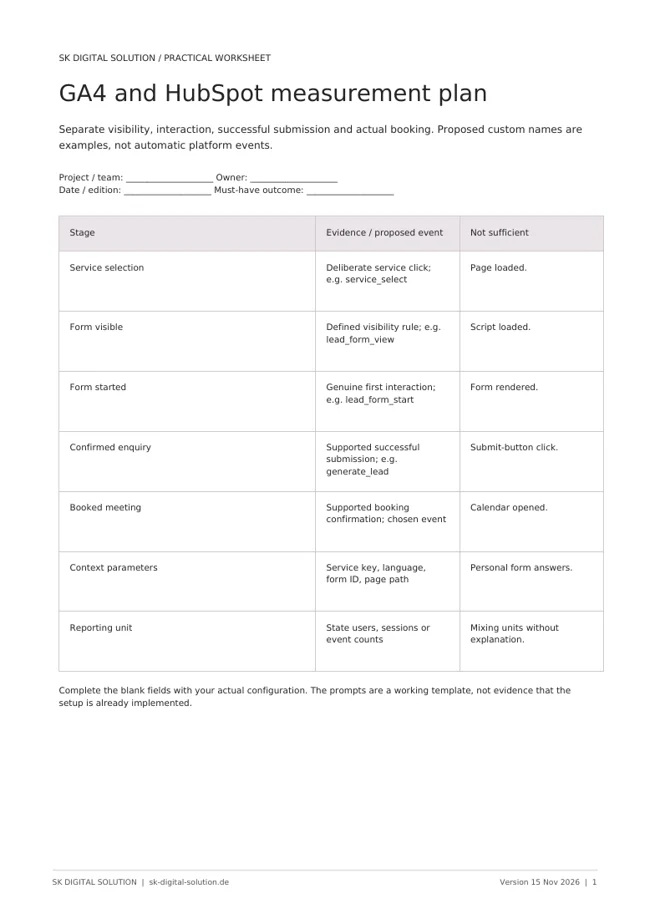
For a B2B website, the useful journey may be a service click, form view, form start, confirmed enquiry and booked meeting. Define those stages before adding tags. Otherwise the reports can contain several impressive-looking counts that describe different events as if they were the same conversion.
Write the measurement plan first
Give each event one meaning. A service-selection click identifies the offer a visitor explored. A form view indicates that the form was presented under your chosen visibility rule. A form start should represent a genuine initial interaction rather than a script loading.
For a confirmed submission, use a successful form event supported by the actual HubSpot form implementation. Keep a booked meeting separate from an enquiry: opening a calendar is not the same as completing a booking.
Use a small, controlled set of parameters such as service key, language, form identifier and page path. Define values consistently so the same service is not reported under several spellings. State which events are custom implementation conventions rather than official automatic events.
Match the listener to the form version
HubSpot's global form-event documentation applies to forms created with the updated editor and documents a successful-submission event. Legacy forms use a different integration approach. Identify the actual form type before copying a tracking snippet from an older tutorial.
For updated forms, the documented success event is hs-form-event:on-submission:success. Your implementation can use that confirmation as the trigger for the intended analytics event, subject to the site's consent and measurement configuration. This is a trigger choice, not a complete plug-and-play tracking installation.
Google's enhanced-measurement documentation also describes form interaction events. Do not assume that automatic form measurement reliably covers every third-party embed or that it is safe to leave overlapping listeners enabled without testing.
Prevent duplicates and false conversions
A frequent problem is counting the same submission through enhanced measurement, a custom listener and a thank-you-page event. Decide which mechanism is authoritative and make the others distinct or remove the duplicate trigger.
Test failed validation. If clicking submit produces a conversion before the form has been accepted, the report overstates leads. Test repeated success events, revisits to a confirmation page and multiple copies of the same form on one page as well.
Use a documented deduplication approach appropriate to the implementation. A stable, non-personal submission identifier may help technical reconciliation where supported, but do not substitute email addresses or other personal information as analytics event keys.
Keep personal information out of Analytics
Google's Analytics data safeguards prohibit sending personally identifiable information to Google Analytics. Do not send names, email addresses, phone numbers or the message entered in a form as GA4 event parameters.
Check URLs as well as the data layer. A confirmation URL containing an email address can leak personal information through a standard page view. Keep the measurement model focused on event context, not the identity or content of the enquiry.
Apply the site's approved consent and privacy configuration, and have the responsible adviser review requirements where needed. Consent Mode or a tag configuration does not itself establish that the complete setup meets every legal obligation.
Validate each stage end to end
Use GTM preview where applicable, GA4 DebugView and a real test record in HubSpot. Each proves a different step: trigger execution, analytics receipt and CRM processing.
- A form view does not create a lead event.
- A first interaction records the intended start event once.
- A validation failure records no successful lead.
- An accepted submission produces one intended confirmation.
- The HubSpot record contains the expected service and page context.
- Meeting measurement uses actual booking confirmation, not calendar opening.
Repeat for each language, embed type and relevant device class. Include permitted and denied tracking states so you understand which observations are expected to be absent.
Read the funnel without confusing event counts and people
Choose a reporting unit deliberately. One person can start a form twice or submit several enquiries. Sessions, users and event counts answer different questions. Do not divide an event count by a user count without explaining what that ratio means.
CRM and GA4 totals will not necessarily match. Consent choices, blockers, session definitions and technical failures can affect measurement. Investigate systematic differences, but do not force the systems to agree by manufacturing events.
For the integration context behind measurement, see our HubSpot and Pretix project. The same principle applies: follow the business event into the destination system, not only through the browser.
Frequently asked questions
Is a submit-button click enough? No. It can happen before validation or a failed request. Use a supported success confirmation for the lead event.
Why are HubSpot and GA4 counts different? They observe different systems under different measurement conditions. Reconcile definitions and test the implementation before interpreting the gap as lost enquiries.
Can I measure meetings on an external booking tool? Only through a supported confirmation or integration path. A click to that tool does not establish that a meeting was booked.
SK Digital Solution connects website tracking with CRM outcomes and practical lead management. Discuss your measurement setup.
Official HubSpot and Google documentation checked on 15 November 2026. Event names beyond documented platform events are design examples, not claims about tracking already installed on your website.