
Webflow and HubSpot Integration: From Website Enquiry to Sales Handover

A useful Webflow HubSpot integration does more than copy an email address into a CRM. It preserves the context of the enquiry, creates or updates the right record and gives a responsible team a clear next action. Start with those outcomes before selecting an embed or connector.
Webflow should communicate the offer and make the next step easy. HubSpot should help the business understand the request and act on it. The integration between them is where page context, data quality and internal responsibility have to meet.
Choose the form approach deliberately
Webflow's HubSpot Forms App documentation describes iframe embeds, developer embeds and connecting native Webflow form elements. These options differ in styling and implementation, and some require particular HubSpot subscriptions. Check the current requirements before promising that every design or behaviour is available in your account.
Choose an approach based on ownership as well as appearance. Who will change the fields? Where are validation and confirmation messages maintained? How will the form behave on mobile and in each language? A form that can only be edited by a developer may not fit a marketing team's operating model.
Do not install several overlapping capture methods to be safe. They can create duplicate events or make it unclear which mechanism produced a record. Document the chosen path and test it directly.
Map meaning, not just field labels
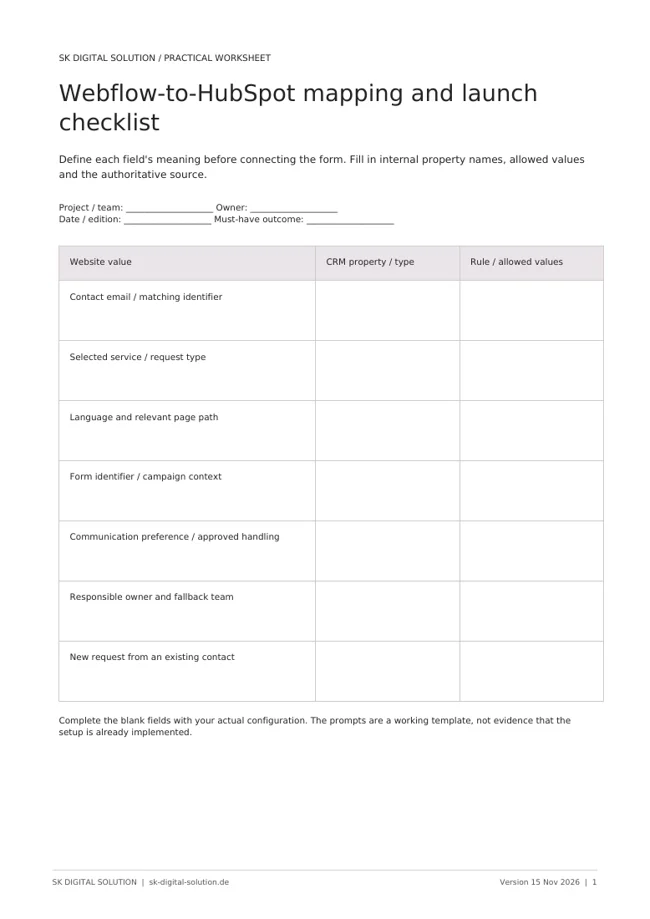
Create a mapping sheet with the visible label, HubSpot internal property name, data type and allowed values. A field called “Service” on the website must map to the intended CRM property, not another property with a similar display name.
Keep the submitted request separate from inferred qualification. Selecting a service describes interest; it does not prove budget, urgency or buying authority. Use clear values that downstream routing and reporting can interpret.
Preserve useful page context without collecting unnecessary personal information. The service requested, form identifier and relevant page path can explain the enquiry. Decide how campaign attribution and communication preferences will be handled, then verify that behaviour with the people responsible for those requirements.
Define ownership before building automation
After submission, somebody must own the next step. Define the rule for the primary team, the fallback when information is incomplete and the expected response process. A notification alone is not a robust handover if everyone assumes someone else will respond.
Distinguish contact creation from lead assignment. An existing contact may submit a new request, work for a company with an established owner or already have an open opportunity. Decide whether the new enquiry creates a task, updates an existing record or starts a separate sales process.
Keep the rules understandable to the business. Start with a small number of explicit conditions such as service, region or existing owner. Add exceptions when they solve a demonstrated need rather than creating a large routing tree at launch.
Test the complete journey on the published domain
Preview is not the final environment. Test the live-domain configuration with agreed test data and follow the record through the CRM, notification and reporting layers.
- Submit a valid new enquiry in each language.
- Submit again using the same contact to check duplicate behaviour.
- Test missing, invalid and unexpected values.
- Confirm page context and selected service reach the right properties.
- Check assignment when a team member is unavailable.
- Verify the confirmation experience on desktop and mobile.
Also test the expected behaviour under different tracking and consent states. A functional form and an analytics event are separate outcomes. Do not treat the presence of a contact as evidence that attribution and GA4 measurement work correctly.
A practical launch checklist names the tester, expected result and evidence for each step. Record the actual CRM record or event identifier where appropriate, without placing personal test data in public documentation.
Measure what happens after the form
A useful funnel connects page engagement with confirmed enquiries and subsequent meetings. Track the service path rather than reporting all form activity as one number. If people select a service but rarely complete the form, inspect the transition and the questions asked before deciding you simply need more traffic.
Review the handover after launch. Look for unassigned requests, duplicate records, incorrect service values and tasks that remain untouched. These are operational signals that the integration needs adjustment.
For a concrete example of connected systems, see our HubSpot and Pretix event-registration project.
Frequently asked questions
Do we need Make or Zapier to connect Webflow and HubSpot? Not always. Evaluate the supported native or embedded options first. Add middleware when a defined requirement justifies another operational layer.
Can the same form serve several service pages? It can if the submitted context reliably distinguishes the page and request. Test that the context remains correct when the form is reused.
Does embedding a HubSpot form complete the integration? No. You still need correct properties, ownership, communication settings, confirmation behaviour and end-to-end testing.
SK Digital Solution designs the public website journey and the CRM process together. Discuss your Webflow-to-HubSpot lead flow.
Official Webflow documentation checked on 15 November 2026. Confirm the current app and account requirements before implementation.