
HubSpot Workflow Goals: Stop Nurturing Contacts Who Already Converted

A HubSpot workflow goal is the condition that tells HubSpot a contact no longer needs the sequence: they booked a meeting, became a sales-qualified lead or asked for a quote. When a contact meets the goal, HubSpot removes them from the workflow before the next action runs. Without a goal, a nurturing workflow keeps emailing people who have already converted – and costs trust at exactly the moment sales takes over.
This guide explains how goals behave, when a suppression segment or an unenrollment trigger is the better choice, and how to test exit rules before a workflow goes live. Product details were checked against HubSpot's knowledge base on 17 November 2026.
Why converted contacts keep receiving nurturing emails
Most nurturing workflows are designed from the entry side: a form submission, a download or a lifecycle stage starts the sequence, followed by several emails with delays. The exit often stays implicit. The team assumes that someone who books a demo will obviously stop receiving the series, but the workflow contains no rule that says so.
The result is familiar. A prospect discusses a proposal with sales on Tuesday and receives a generic “Have you considered …” email on Wednesday. Reporting suffers as well, because the workflow cannot show how many contacts reached the outcome it was built for. An explicit exit rule solves both problems.
What a workflow goal does in HubSpot
According to HubSpot’s documentation on workflow goals, goals are available in contact-based workflows with Professional or Enterprise editions of Marketing Hub, Sales Hub, Service Hub, Data Hub, Smart CRM or Revenue Hub. Viewing the goal conversion rate requires Marketing Hub Professional or Enterprise.
Three behaviours matter in practice:
- Exit during the sequence: an enrolled contact who meets the goal criteria is unenrolled before the next action executes.
- Check at enrollment: when a contact is first enrolled, HubSpot checks the goal. A contact who already meets it is not enrolled.
- Measurement: the goal conversion rate shows the share of contacts who met the goal after being sent an email in the workflow, so it needs a send-email action.
Goals exist only for contacts. Company, deal, ticket and quote workflows use unenrollment triggers instead.
Goal, suppression segment or unenrollment trigger?
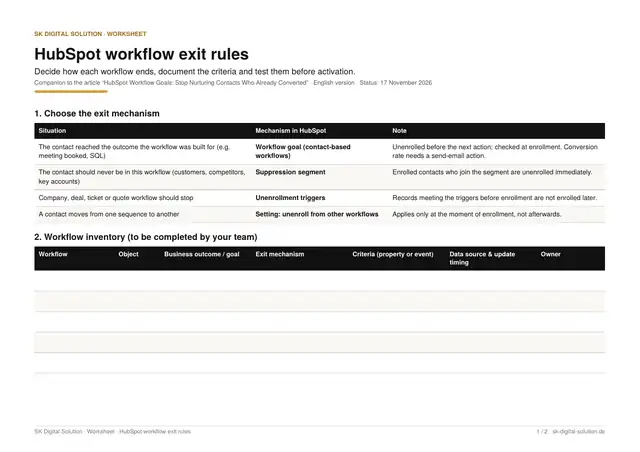
HubSpot offers several ways to end a workflow, and each answers a different question. HubSpot itself recommends goals when a workflow sends marketing emails and suppression lists when it does not. A practical rule of thumb:
- Workflow goal: the contact has reached the outcome the workflow was built to produce, and you want to measure that outcome.
- Suppression segment: the contact should never be in this workflow, for example existing customers, competitors or contacts managed by a key-account team. According to HubSpot’s unenrollment documentation, an enrolled contact who joins the suppression segment is unenrolled immediately.
- Unenrollment trigger: the record-based alternative for company, deal, ticket and quote workflows. A record that is not yet enrolled and meets these triggers will not be enrolled later, even if it meets the enrollment criteria.
The workflow settings also include an option to remove a contact from other workflows when they enter this one. As described in HubSpot’s article on workflow settings, it applies only at the moment of enrollment and does not remove the contact from other workflows later. It helps with handovers between sequences, but it does not replace a goal.
Define the goal from the business outcome
A good goal describes a result, not an activity. “Opened three emails” is engagement; “booked a meeting” or “lifecycle stage is sales-qualified lead or later” is an outcome sales can act on. If your lead scoring separates fit, engagement and buying intent, the intent signal is often the right goal for a nurturing workflow.
Before you configure it, agree on these points with marketing and sales:
- Which property or event proves the outcome, and which system sets it.
- Whether the condition is stable or can change back, such as a lifecycle stage that is reset manually.
- Which contacts must never be enrolled, regardless of their behaviour.
- Who owns the workflow and reviews its conversion rate.
Write the goal in plain language next to the workflow, for example in its description. That keeps the history understandable when criteria change: HubSpot continues to count a contact who met an earlier goal as having met it, and removing all goal criteria resets the goal count and conversion rate.
Test exit rules before activating the workflow
A workflow that starts correctly can still end incorrectly. Use test contacts and walk through the cases that cause problems in daily operations:
- A contact who already meets the goal before enrollment.
- A contact who meets the goal between two email steps.
- A contact who joins the suppression segment while enrolled.
- A contact whose goal property is set by an integration rather than inside HubSpot.
- A contact who could re-enroll after leaving the workflow.
Check the timing as well. If the property behind the goal is updated by a form, an integration or a sales rep, find out how quickly it changes in HubSpot. A goal can only stop the next email if the data arrives before that email is sent.
Read the goal conversion rate with care
The conversion rate is a useful signal, but it does not prove that the emails caused the result. A contact may have booked the meeting after a call or an event. Compare the rate across similar workflows, look at the time between enrollment and goal, and combine it with sales feedback on lead quality.
Because the rate only counts contacts who received an email from the workflow, it says little about internal workflows that only update properties or create tasks. Use suppression segments and clear documentation for those instead.
Frequently asked questions
Can I use goals in deal-based workflows? No. Goals are available for contact-based workflows. For deals, companies, tickets and quotes, HubSpot uses unenrollment triggers.
Does a goal unsubscribe the contact from marketing emails? No. A goal only ends that workflow; it is not a subscription setting. Subscription preferences are managed separately.
Exit rules are part of a reliable lead handover. SK Digital Solution reviews and builds HubSpot workflows together with your marketing and sales teams. Talk to us about your workflows.
HubSpot documentation checked on 17 November 2026 and re-checked on 23 November 2026. Features and editions can change; confirm them in your portal before implementing.