
Webflow vs. WordPress vs. TYPO3: Choosing a CMS for a B2B Relaunch
Choose a CMS by the website your business needs to operate, not by the visual style of a demo. Webflow, WordPress and TYPO3 can appear in a B2B relaunch shortlist, but your editorial workflow, integrations and maintenance responsibilities should determine the evaluation. A new interface will not fix unclear content ownership or an unreliable enquiry process.
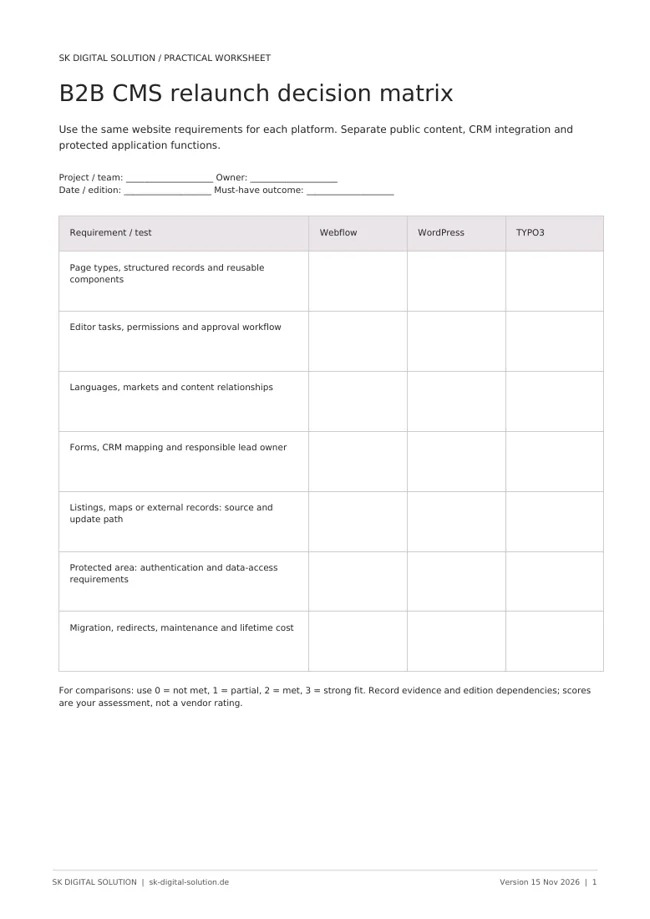
Start by separating three things: the public website, the customer data it exchanges and any authenticated portal or application. They may share a brand without needing to share the same technical platform. Trying to force every requirement into one CMS can make a manageable relaunch unnecessarily complex.
Establish what the website actually does
Inventory page types rather than just counting URLs. A homepage, a reusable service page, an article, a location listing and a protected partner resource have different requirements. Identify the fields, filters, languages, editors and approval steps needed for each.
Also document what happens after a visitor submits a form. A beautiful lead-generation website is incomplete if enquiries enter the wrong CRM property or nobody receives the next action. Treat website-to-CRM integration as part of the relaunch scope, not an optional item after design.
A short requirements catalogue should include the public journey, editorial tasks, accessibility expectations, SEO migration, integrations and ongoing ownership. Distinguish mandatory functionality from a feature somebody might want later.
Compare the authoring and maintenance model
Webflow's CMS combines visual page design with structured content. Evaluate it by asking your editors to update real pages and reusable collection items, then test whether the resulting structure supports the intended site.
For WordPress, examine the actual theme, editor and plugin architecture proposed for your project. “WordPress” alone does not tell you whether editing will be straightforward or dependent on a developer. Its official support policy also makes current software maintenance an explicit consideration.
TYPO3's official multisite and multilingual overview describes multiple websites and languages within one installation, while its permissions documentation explains granular access. These can be important requirements for distributed editorial teams. For a TYPO3 evaluation, require a demonstration of the intended editorial configuration and extension architecture rather than relying on the reputation of the platform. If the existing site uses TYPO3, inventory the installed version, extensions and custom functionality before deciding what a move would involve. Replacing the CMS label is not a migration plan.
Test integrations and protected functions separately
Some requirements are ordinary content; others are application behaviour. A public property listing can use structured records, while a partner portal may require authentication, permissions and a separate data-access model. Do not assume that making a page private provides all the controls a portal needs.
For every integration, identify the source of truth. If an external CRM owns location records, decide how updates reach the website and how deleted records are handled. If an editor owns a public description, avoid overwriting it during the next data sync.
Use a proof of concept for the hardest requirement before approving the design direction. That might be a filtered listing, a map driven by external records or a multilingual form with the correct CRM routing. The purpose is to expose dependencies early, not to rebuild the entire website twice.
Protect existing search visibility during the move
A relaunch can change URLs, navigation, titles and content at the same time. Create a page inventory and map old pages to suitable new destinations. Preserve valuable content where it still answers a customer need, and review redirects rather than sending every retired URL to the homepage.
Use our website visibility guide as a starting point for discovery and indexing checks. SEO should influence the migration plan before development is complete.
Ask the implementation team to verify:
- Crawlable pages and intentional indexing settings.
- Meaningful page titles, headings and internal links.
- Correct redirects and canonical destinations.
- Language-specific content and URL handling.
- Forms, analytics and CRM handovers on the real domain.
A CMS does not guarantee rankings. The content, implementation and migration decisions still determine whether search engines and visitors can understand the site.
Choose the smallest sustainable architecture
A marketing-led website may prioritise visual iteration and reusable content. A larger editorial operation may place greater weight on permissions, structured publishing and its existing technical investments. A site relying on specialised plugins or extensions needs a credible long-term maintenance plan, whichever platform is selected.
Price the full lifecycle: design, build, migration, licences, hosting, updates, integrations and future changes. Also consider the cost of keeping the existing CMS and improving the weak parts. A relaunch should have a business reason beyond wanting a different editor.
Frequently asked questions
Is Webflow automatically better for SEO? No. It offers relevant controls, but technical setup, useful content, performance and internal linking still need to be implemented and reviewed.
Does WordPress always require many plugins? No. The architecture determines the dependencies. Ask for an explicit plugin inventory and a maintenance owner rather than assuming all builds are alike.
Should every TYPO3 website be migrated? No. Compare the cost and benefits of improving the existing setup with a replacement that meets the same requirements. Preserve working functionality unless there is a reason to change it.
SK Digital Solution connects website strategy, CRM integration and practical operation. Discuss your relaunch requirements before committing to a platform.
Official Webflow, WordPress and TYPO3 documentation checked on 15 November 2026. This is a requirements-led selection guide; each platform's suitability must be validated against the proposed implementation.