
HubSpot Segments: When to Use Active vs. Static Segments

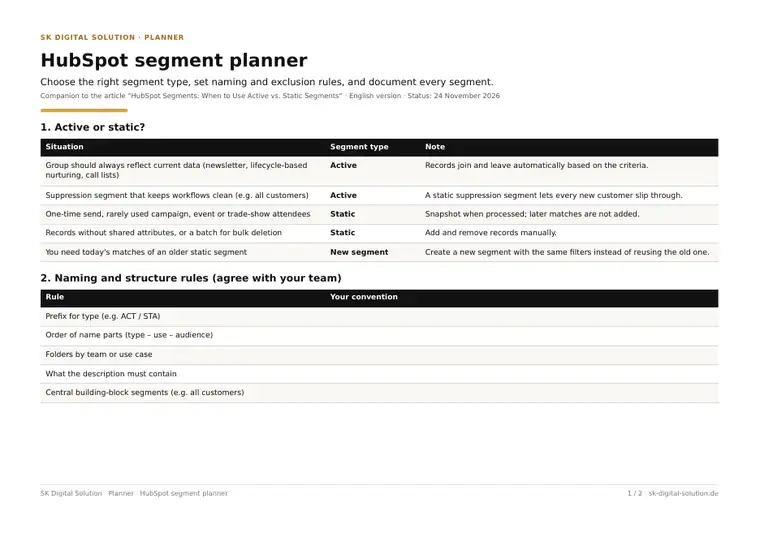
In HubSpot, an active segment updates itself: records join when they meet the criteria and leave when they no longer do. A static segment is a snapshot of the records that matched when it was processed and only changes when someone adds or removes records by hand. Use active segments for anything that should follow your data – newsletters, lifecycle-based nurturing, sales call lists. Use static segments for fixed groups such as event attendees, one-off sends or a clean-up batch.
The choice sounds technical, but it decides whether the right people receive the next email, whether a workflow keeps enrolling the right records and whether reports still mean something in six months. This guide explains the difference, the typical mistakes and a simple way to keep your segment structure maintainable. Product details were checked against HubSpot's knowledge base on 24 November 2026.
Active and static segments in HubSpot
HubSpot renamed lists to segments, but the logic stayed the same. According to HubSpot's documentation on creating segments, segments are available in all products and plans, and creating them requires Edit Segment permissions. You choose the type when you save the segment.
- Active segment: membership is recalculated from the criteria. A contact whose lifecycle stage changes moves in or out without anyone touching the segment.
- Static segment: membership is fixed when the segment is processed. New records that match later are not added, and records that no longer match are not removed automatically.
Both types can be built for different objects, such as contacts, companies or deals, and both can use property, event and membership filters. HubSpot allows up to 250 filters per segment, including up to 60 associated object filters – a limit that well-structured segments rarely come close to.
When to use an active segment
Choose an active segment when the group should always reflect the current state of your data. Typical cases are:
- a regular newsletter whose subscriber base changes every week,
- nurturing based on properties that change over time, such as lifecycle stage or lead status,
- sales call lists based on behaviour and property values,
- suppression segments that must keep workflows clean, for example all current customers.
The last case is easy to underestimate. If a segment is used to keep customers out of a nurturing workflow, it has to be active; otherwise every new customer slips through. Our article on workflow goals and suppression segments shows how these exits work together.
When a static segment is the better choice
A static segment is right when the group must not change after you have defined it. HubSpot names one-time email sends, rarely used campaigns, event or trade-show attendees, groups without shared attributes and records collected for a bulk deletion as typical examples.
Static segments are also useful as documentation. If you want to know exactly who received a campaign in March, a snapshot answers that question; an active segment would already show a different group. When you need the current matches of the same criteria later, HubSpot recommends creating a new segment with the same filters instead of reusing the old one.
Exclusions: where most segment errors happen
Many segments are built correctly on the inclusion side and fail on the exclusion side. HubSpot offers several ways to keep records out, described in its documentation on segment exclusions:
- excluding individual records, for example an employee's test contact,
- excluding another segment, such as all customers or all disqualified leads,
- filters with negative operators, for example lifecycle stage is none of Customer,
- exclusion rules for contact segments, such as non-marketing contacts, specific email domains or unsubscribed contacts.
One detail matters for static segments: their exclusions are evaluated when the segment is saved. If the exclusion segment changes afterwards, the static segment does not update. When exclusions need to stay current, use an active segment or re-save the static one before every use.
A segment structure your team can maintain
Portals rarely suffer from too few segments. They suffer from hundreds of segments nobody can explain. A few rules keep the structure readable:
- Name by purpose and type: for example “ACT – Nurturing – MQL without meeting” or “STA – Event – Trade fair 2026 attendees”.
- Use folders by team or use case, such as marketing emails, workflows, sales and clean-up.
- Fill in the description: what the segment is for, which workflow, email or report uses it, and who owns it.
- Separate building blocks from uses: a central active segment such as “All customers” can be reused as a filter or exclusion in many other segments instead of copying the same criteria again and again.
- Review regularly: delete segments without a current use once you have checked that no workflow or report depends on them.
Clear segments also make lead scoring easier to use, because a score is only valuable when the right groups act on it.
Test a segment before you use it
Before a segment sends an email or enrolls records in a workflow, use the Test matches option in the segment editor to check individual records. Pick at least one record that should be included, one that should be excluded and one borderline case, such as a contact with an associated company that only partly matches. Check AND and OR logic between filter groups, because a misplaced OR often makes a segment far larger than intended.
Finally, look at the record count after processing. If it is much higher or lower than expected, review the filters before the segment is used anywhere.
Frequently asked questions
Can I convert a static segment into an active one? Plan for a new segment. Create an active segment with the same criteria and update the workflows, emails or reports that should use it.
Do segments decide who may receive marketing emails? Not on their own. Exclusion rules can remove non-marketing or unsubscribed contacts from a contact segment, but subscription preferences and marketing contact status are managed separately.
A clean segment structure is the basis for reliable emails, workflows and reports. SK Digital Solution reviews HubSpot portals and builds segment structures together with your marketing and sales teams. Talk to us about your HubSpot setup.
HubSpot documentation checked on 24 November 2026. Features and limits can change; confirm them in your portal before implementing.