
HubSpot and Make Integration: Build Scenarios That Don't Duplicate or Lose Data

Connecting HubSpot and Make takes a few minutes: authorise the HubSpot CRM app in Make, pick a trigger, map a few fields. Keeping that connection reliable is the real work. A Make scenario that writes into HubSpot should know which record it is updating, what happens when HubSpot or another system answers with an error, and who notices when something goes wrong. If these three questions are answered before the scenario goes live, you avoid the two most common problems: duplicate records and data that silently never arrives.
This guide is for teams that already use Make, or have chosen it after comparing n8n, Make and Zapier, and now want to connect it to their CRM in a way that still works in a year. It focuses on design decisions, not on a click-by-click setup.
Start with the job, not the modules
Before anyone opens the scenario editor, describe the job in one sentence: which event starts the scenario, which HubSpot object is written, and which system is the source of truth for each field. “When an order is paid in the shop, update the company in HubSpot and create a deal” is a clear job. “Sync the shop with HubSpot” is not, because nobody can say afterwards whether the scenario did what it should.
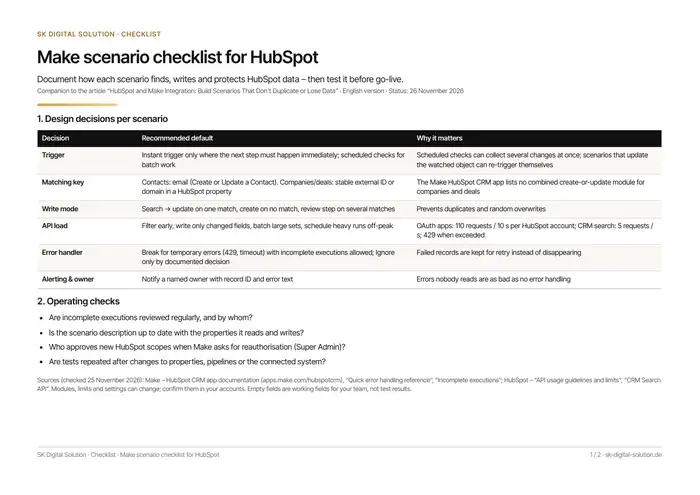
Write down the same details for every scenario: trigger, objects, the field used to find existing records, the error handling and the person responsible. The companion checklist for this article gives you a table for exactly that.
Choose the trigger deliberately
Make's HubSpot CRM app offers watch modules for contacts, companies, deals, tickets, form submissions and other CRM objects, plus a webhook-based notification module. Some triggers react instantly, others check for new or changed records on the schedule you set for the scenario. Both are valid, but they lead to different behaviour: a scheduled check can pick up several changes at once and processes them in a batch, while an instant trigger runs once per event.
Two questions help with the choice. First, how fast does the next step really need to happen? A sales notification may need to be immediate, a nightly enrichment does not. Second, can the trigger fire for changes the scenario made itself? A scenario that watches updated contacts and then updates the same contact can trigger itself again. Filter on the property that matters or set a marker field so the scenario ignores its own changes.
Search before you create
Duplicates rarely come from HubSpot itself. They come from scenarios that create a record without checking whether it already exists. For contacts, the HubSpot CRM app in Make has a Create or Update a Contact module, which works with the email address as the key. For companies and deals, the app lists separate create and update modules but no combined one, so the scenario needs its own logic:
- search for the record by a stable key, for example the company domain or an external ID stored in a custom HubSpot property,
- update the record if exactly one match is found,
- create it only if no match is found,
- route several matches to a review step instead of picking one at random.
An external ID property is the most robust key. If your shop, ERP or event tool has its own customer or order number, store it in HubSpot and search by it. Names and free-text fields are poor keys, because the same company is often written in three different ways.
Plan for HubSpot's API limits
Every HubSpot module in Make is an API call, and HubSpot limits how many calls an app may make. According to HubSpot's API usage guidelines, a publicly distributed OAuth app such as Make's standard connection is limited to 110 requests every 10 seconds for each HubSpot account that installs it. The CRM search endpoints have their own limit of five requests per second per account and return at most 200 records per page and 10,000 results per query. When a limit is exceeded, HubSpot answers with an HTTP 429 error.
For a single form submission this never matters. It matters for imports, nightly syncs and scenarios that loop over hundreds of records with a search module in every iteration. In those cases, reduce the number of calls: filter early, only write fields that actually changed, process large sets in smaller batches and schedule heavy scenarios outside peak times. Every module run also counts towards your Make plan's usage, so fewer calls save on both sides.
Make failures visible
A scenario without error handling either stops or skips a record, and in both cases someone has to notice. Make offers five error handlers that decide what happens when a module fails:
- Ignore drops the failed bundle and lets the scenario finish successfully,
- Resume continues with a substitute value you define,
- Commit stops the scenario and keeps the changes made so far,
- Rollback stops the scenario and reverts changes where the modules support it,
- Break stores the remaining steps as an incomplete execution that can be completed automatically or resolved by hand.
For writes into HubSpot, Break is usually the safest default for temporary problems such as a 429 or a timeout, because the record is not lost and can be retried. Storing incomplete executions has to be allowed in the scenario settings. Ignore should be reserved for cases where losing a single record is truly acceptable, and that decision should be written down. Make also stops scheduling a scenario after repeated consecutive errors, which is another reason to see failures early.
Add a notification for errors that need a person, for example an email or chat message to the owner with the record ID and the error text. A failed run that nobody reads is not much better than no error handling at all.
Ownership and documentation
Most integration problems appear months later, when a property is renamed, a pipeline stage is added or the person who built the scenario has moved on. Name scenarios by job and direction, for example “Shop → HubSpot – paid order to deal”. Note in the scenario description which HubSpot properties it reads and writes. Agree who receives error notifications and who may change the scenario, and check the connection when HubSpot asks for new permissions: according to Make's documentation, a HubSpot Super Admin has to approve the app and any added scopes.
The same discipline applies to website forms. If enquiries reach HubSpot through your site, our guide to Webflow and HubSpot integration shows how to keep that path clean before automation builds on it.
Test before go-live
Run every scenario with test records before you switch it on. Cover at least four cases: a new record, an existing record that should be updated, a record that matches twice, and an error, for example a missing required field. Check in HubSpot that no duplicate was created, that only the intended properties changed and that the error reached the right person. Repeat the tests after changes to properties, pipelines or the connected system.
A reliable HubSpot–Make setup is less about clever modules and more about clear keys, visible errors and named owners. SK Digital Solution designs and reviews automations between HubSpot, websites and business tools. Talk to us about your integration.
Make and HubSpot documentation checked on 25 November 2026. Modules, limits and settings can change; confirm them in your accounts before implementing.