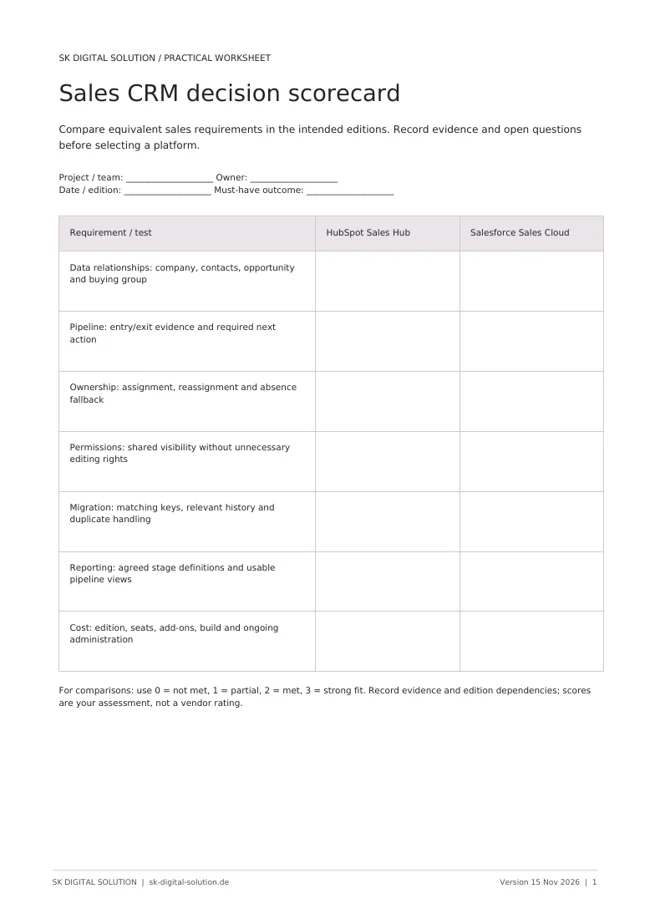

HubSpot Sales Hub vs. Salesforce Sales Cloud: Which CRM Fits?

HubSpot Sales Hub and Salesforce Sales Cloud can both support a structured B2B sales process. The better choice depends on how your business sells, how much configuration it needs and who will maintain the system after launch. Start with the journey from a qualified enquiry to a closed deal, not a checklist of features.
For a team already using HubSpot for marketing and customer service, Sales Hub is a logical option to evaluate on the same customer platform. Salesforce deserves close evaluation when an established Salesforce environment or a highly specific sales operating model shapes the requirements. These are selection hypotheses, not universal rules: test them with your own records and salespeople.
Compare the same sales journey
A useful HubSpot vs. Salesforce comparison begins with a real opportunity. Follow it through qualification, assignment, discovery, proposal, negotiation and handover. At every stage, identify the information the salesperson needs, the action they must take and the evidence required to advance the deal.
Both vendors position their sales products around customer relationships and pipeline management. Their Sales Hub and Salesforce sales pages describe the current product scope. The practical question is not whether a feature exists somewhere in the portfolio, but whether your proposed edition makes the whole process workable.
For example, a regional account model may need shared visibility, restricted editing and explicit rules for cross-border ownership. A smaller team may care more about entering a deal quickly and seeing the next follow-up. Use these differences to design the evaluation rather than assuming company size decides the winner.
Make the data model a buying criterion
List the business entities you actually manage: people, companies, opportunities, products and any additional records. Then document their relationships. A company associated with several opportunities is straightforward; a network of parent companies, partners and multiple buying groups needs closer testing.
Ask each implementation team to demonstrate your difficult relationships using the intended subscription. Check whether the answer relies on standard records, additional configuration, custom objects or another product. Also test reporting and permissions on that model. A record can be easy to create yet difficult to report on correctly.
Migration deserves the same scrutiny. Decide which historical activities matter, which identifiers prevent duplicates and which fields have a reliable source. Moving every old field into the new CRM preserves complexity rather than solving it.
Compare the cost of operating the CRM
Seat prices are only one part of the decision. Build a first-year and ongoing operating model covering subscriptions, required editions, implementation, migration, integrations, training and administration. Add the cost of changes you expect after launch, such as a new sales team or a revised qualification process.
Avoid comparing a lightweight HubSpot configuration with a heavily extended Salesforce configuration, or the reverse. Give both vendors the same requirements and request a written explanation of what is included. AI, quoting, advanced reporting and additional products should be explicit line items where relevant, not assumptions hidden in a demo.
Administration is a business requirement. Name the person who will maintain pipelines, properties, access and automations. If that responsibility is unclear, even a strong implementation can deteriorate when teams create workarounds.
Run a small, realistic evaluation
Use anonymised sample records and ask actual users to complete the same tasks in both systems. Measure the work involved, not just their initial impression of the interface.
- Qualify an inbound enquiry and assign an accountable owner.
- Create an opportunity associated with the correct company and contacts.
- Record a meeting, update the next step and prepare a proposal handover.
- Produce a pipeline view with agreed stage definitions.
- Reassign an account and check what each team can see.
Include one messy record and one exception. A polished happy-path demonstration will not reveal how the system handles missing information, duplicates or a deal involving multiple teams. Record the configuration and licensing dependencies exposed by each task.
Choose the system your team can sustain
Choose HubSpot if your evaluation shows that its proposed configuration supports the required sales process and gives your teams a maintainable shared customer record. Choose Salesforce if its proposed configuration better matches the operating model and you have a realistic plan to own its administration. Neither recommendation means the other platform is incapable.
Before signing, agree on acceptance criteria: usable records, reliable ownership, a tested migration, meaningful reports and a documented handover to administrators. These outcomes are more valuable than a promise that the tool will transform sales automatically.
For another perspective, read our HubSpot Sales Hub vs. Microsoft Dynamics 365 Sales comparison.
Frequently asked questions
Is HubSpot always cheaper than Salesforce? No. The answer depends on editions, users, additional products, usage and implementation scope. Compare equivalent requirements and total operating cost rather than advertised starting prices.
Can a complex B2B business use HubSpot? Potentially, but complexity must be tested against the actual data model, permissions and subscription. Do not infer fit from a company-size label alone.
Should we replace a working Salesforce system? Not without a documented business reason. First distinguish platform limitations from configuration, data-quality and adoption problems. Improving an existing setup may be the more sensible project.
SK Digital Solution helps connect CRM decisions with the website journey and internal processes. Discuss your sales process with us before choosing which configuration to build.
Product scope checked against the official vendor pages on 15 November 2026. This is an implementation-led editorial assessment, not an independent software benchmark or a price quotation.